Session#
Session is the main runtime object in OpenRath. Agent calls, tool calls, compression, and multi-agent handoffs all end up as changes to a Session.
This page explains how Session carries state, execution placement, lineage, lazy output materialization, and how fork(), detach(), merge(), run_session_loop(...), and run_session_compress(...) affect the session graph and sandbox handle.
Start with the diagram below: it shows the three pieces of state a session carries, and the lifecycle operations that move or derive that state.
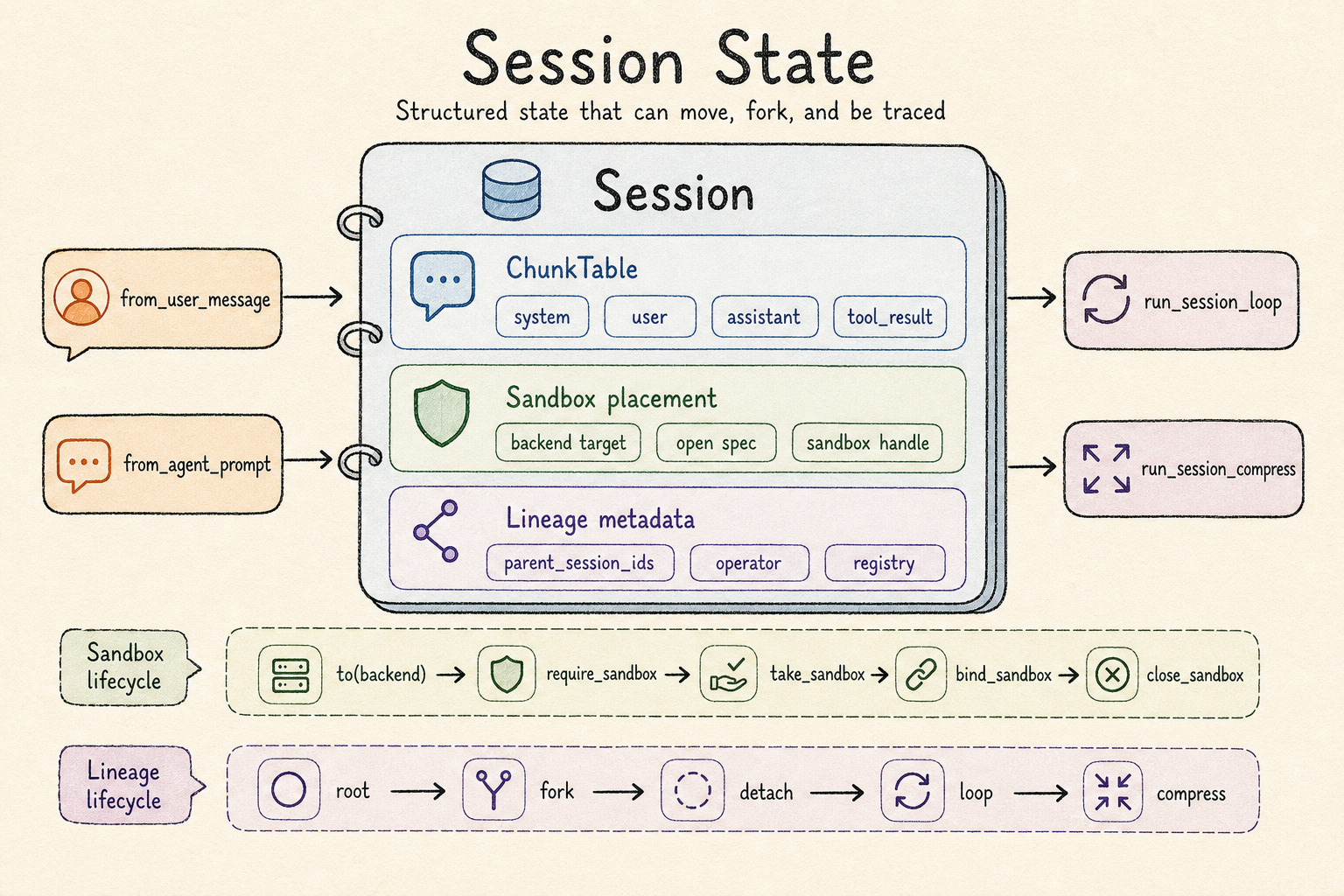
Session keeps conversation chunks, sandbox placement, and lineage metadata in
one object so that state can move through agent and workflow calls.#
Overview#
Session is made of three kinds of state:
Layer |
Stored in |
Purpose |
|---|---|---|
Conversation content |
|
Which system/user/assistant/tool content the current agent can see. |
Execution placement |
|
Which backend receives tool side effects. |
State origin |
|
Where this session came from and which operation produced it. |
These layers live in the same object because content state and execution state move together through an agent workflow. After one agent produces a tool call, later agents need to read the tool result and may continue using the same sandbox. Session is the value passed along that chain.
Source map#
File |
Responsibility |
|---|---|
|
|
|
|
|
|
|
|
|
|
|
Graph traversal and acyclic validation. |
Why Context Is A Table#
Session.chunk_table is a time-ordered tuple of ChunkRow values. Each row has a kind and a payload. This fits an agent runtime better than a single string because tool calls need structured data.
Chunk kind |
Key payload fields |
Produced by |
LLM message |
|---|---|---|---|
|
|
|
|
|
|
|
|
|
|
|
|
|
|
After tool execution |
|
The key conversion happens in chunk_table_to_messages(...):
from rath.session import Session
from rath.session.chunk import chunk_table_to_messages

user = Session.from_user_message("List files.")
messages = chunk_table_to_messages(user.chunk_table)
print(messages[0].role)
print(messages[0].content)
The main constraint here is that OpenRath stores a replayable transcript. tool_calls in assistant rows and tool_call_id in tool_result rows are rebuilt into OpenAI-compatible messages on the next LLM request, so the model can see which tool it just called and what the tool returned.
Agent Session And User Session#
OpenRath stores the system prompt in an agent-side session and stores user input plus runtime results in a user-side session.
Session |
Typical content |
Lifecycle |
|---|---|---|
agent session |
|
Held by |
user session |
|
A workflow call produces new sessions as it runs. |
When run_session_loop(...) builds a request, it places agent session messages before user session messages:
request messages = agent_session rows + user_session rows
The output session starts from user-side rows and then appends assistant/tool rows. The system prompt is not copied into the output session. This keeps agent configuration separate from user runtime state: change the agent session and the same user session can enter a different behavior.
Session graph#
Every Session has an id. When an operation creates a new session, OpenRath records its origin in lineage fields.
Field |
Meaning |
|---|---|
|
UUID of the current session. |
|
Parent sessions that produced this session. |
|
Name of the operation that produced this session. |
|
Operation category, such as fork, detach, loop, or compress. |
|
Extra structured metadata. |
The graph explains how a run happened. In a multi-agent workflow, each agent receives the output session from the previous agent. In a nested workflow, child workflows also receive and return sessions. As long as each operation records its parents, the final result can be traced back through the steps that produced it.
Five Primitives#
Current Session changes can be understood through five primitives.
Primitive |
Code entry point |
Content behavior |
Graph behavior |
Sandbox behavior |
|---|---|---|---|---|
create |
|
Creates a one-row transcript. |
Classmethods default to |
No sandbox target. |
fork |
|
Copies chunk rows. |
Parent points to the source session, |
Shares the open handle when present; otherwise copies the backend target. |
detach |
|
Copies chunk rows. |
Parent is empty, |
Shares the open handle when present; otherwise copies the backend target. |
merge |
|
Concatenates chunk rows. |
Parents point to both input sessions. |
Keeps the left-hand session’s sandbox; does not take ownership from |
loop |
|
Copies user rows and appends assistant/tool rows. |
Parents are the user session and agent session. |
Takes the sandbox from the input user session and binds it to the output session. |
compress |
|
Writes the model summary as a new user row. |
Parents are the user session and agent session, with lossy compression metadata. |
Takes the sandbox from the input user session and binds it to the output session. |
When to use fork#
Use fork() when multiple follow-up paths should start from the same state. For example, the same user request can be tried by two different workflows. The forked session keeps its parent, so the graph shows that it came from the original state.
When to use detach#
Use detach() when a transcript should become a fresh starting point. It preserves content and the backend target, but leaves graph parents empty. This is useful when intentionally cutting lineage, such as exporting an intermediate state as the entry point for a new task.
When to use compress#
Use run_session_compress(...) to turn a long transcript into a new user-side summary. It disables tool use and requires the model to return text only. In the current implementation, tool calls in the model response raise RuntimeError.
Sandbox Lifecycle#
Session stores both the sandbox target and the open handle.
Field |
Meaning |
|---|---|
|
Backend name, such as |
|
Spec used to open the backend; string specs become |
|
Open |
Common methods:
Method |
Behavior |
|---|---|
|
Closes the current handle, sets the backend target, and returns the same session. |
|
Releases the current handle (if any) and takes a reference on |
|
Returns the current handle; if only a backend target exists, opens it lazily and acquires one reference. |
|
Drops this session’s reference; the backend closes the handle when the count reaches zero. |
|
Duplicate the transcript and share the sandbox reference with the new session (refcount + 1). |
|
Concatenates rows and preserves the left-hand sandbox ownership; |
fork() and detach() share the open handle with the new session via bind_sandbox. merge(other) is intentionally left-biased in v1.2: the merged session keeps self.sandbox, ignores other.sandbox, and only raises when both inputs are unbound but point at different backend names.
from rath.session import Session

source = Session.from_user_message("Inspect project.").to("local")
with source:
    forked = source.fork()
    assert source.sandbox is forked.sandbox  # shared reference
    assert source.sandbox._refcount == 2
run_session_loop State Transfer#
run_session_loop(...) does four things:
Merges built-in tools with user-provided
FlowToolCallobjects.Shares the input user session’s sandbox with the output session (refcount + 1).
Runs LLM completions in a loop; if the assistant returns tool calls, executes tools and appends
tool_result.When there are no tool calls, appends the final assistant row and returns the output session.
The state transfer is:
Location |
Before loop |
After loop |
|---|---|---|
Input user session |
Holds original user rows and may hold a sandbox. |
Sandbox unchanged; the input session keeps its reference. |
agent session |
Holds system rows. |
Unchanged. |
Output session |
Does not exist. |
Holds user rows, assistant rows, tool result rows, and a shared reference to the same sandbox. |
In v1.2, the loop may hand back a lazy output session before all model/tool work has been materialized. Lineage fields and sandbox ownership are available immediately; reading chunk_table, reading cumulative_usage, or explicitly calling synchronize() waits for pending async work to finish.
Tool errors do not directly stop the loop. The current implementation writes errors as JSON tool_result chunks and sends that result back to the model. There are three cases:
Case |
Written error kind |
|---|---|
Tool arguments are not parseable JSON |
|
Model requested an unknown tool |
|
Tool execution raised an exception |
|
run_session_compress State Transfer#
run_session_compress(...) uses the same agent/user session concatenation, but it creates a new user-only session.
Behavior |
Current implementation |
|---|---|
Request content |
agent session rows + user session rows + compression instruction. |
tool choice |
Tools are forced off. |
Output content |
Model text becomes the only |
sandbox |
Shared with the output session via |
lineage extras |
|
This operation is lossy. It reduces context length, and the compressed session keeps only the summary text written by the model.
Code Reading Checkpoints#
Question |
Where to look |
|---|---|
How a row becomes an LLM message |
|
When sandbox lazy open happens |
|
How loop shares the sandbox |
|
How compress disables tools |
|
Whether fork/detach copy an open handle |
|
Edge Cases#
Behavior |
Current implementation |
|---|---|
|
Raises |
|
Raises |
|
Copy chunk rows and share the source session’s sandbox reference (refcount + 1). |
|
Concatenates rows, keeps the left-hand sandbox, and sums usage after synchronizing lazy inputs if needed. |
|
Output session shares the input user session’s sandbox reference (refcount + 1). |
lazy output session |
|
malformed tool arguments |
Writes JSON error |
unknown tool |
Writes JSON error |
tool exception |
Catches the exception and writes JSON error |
compress tool calls |
|
Test Coverage#
Behavior |
Tests |
|---|---|
chunk to messages |
|
sandbox lifecycle |
|
fork/detach primitives |
|
loop with local backend |
|
loop edge cases |
|
lineage graph |
|
live loop/compress |
|