Tool#
OpenRath separates model-callable capabilities from the side effects that actually happen in a sandbox. FlowToolCall faces the model and session loop; BackendTool* payloads face the backend and sandbox.
This page explains how model tool calls enter OpenRath, the schema/runtime contract for FlowToolCall, how backend payloads execute in local/OpenSandbox, and how results are written back to Session.
The diagram below follows one tool from definition to model schema, backend
execution, and final tool_result writeback.
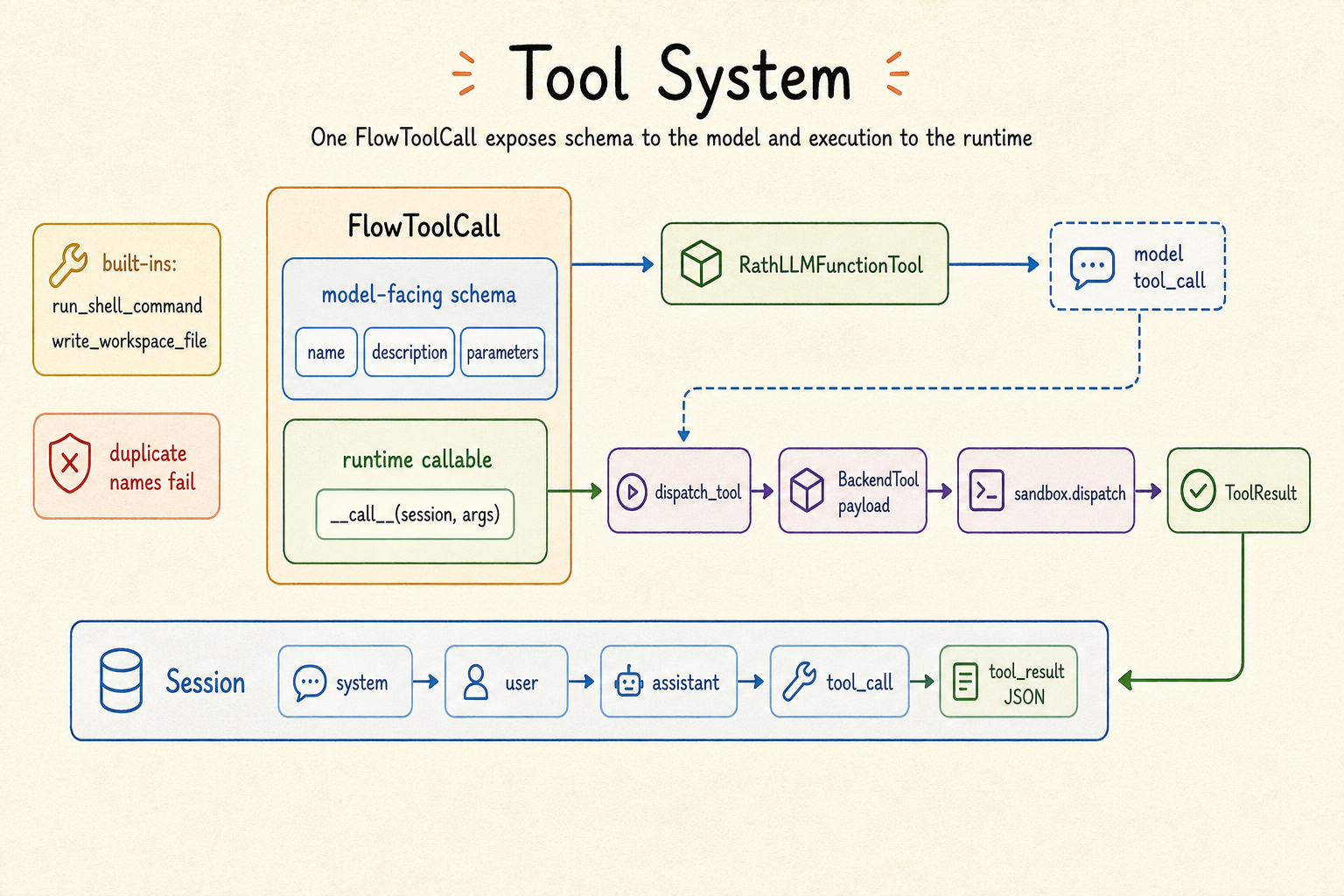
FlowToolCall has two faces: a schema that the model can call and a Python
callable that can run directly or dispatch work to a backend.#
Overview#
A tool call crosses three boundaries:
Layer |
Object |
Responsibility |
|---|---|---|
Model interface |
JSON schema |
Tells the model which tools exist and what arguments they accept. |
Python runtime |
|
Receives the current |
Sandbox backend |
|
Runs command, file, and code operations in local or OpenSandbox. |
This split gives custom tools two implementation paths: simple tools can return a dict directly from the Python process; tools with side effects can hand work to the backend through session.require_sandbox().dispatch(...).
Source map#
File |
Responsibility |
|---|---|
|
|
|
Built-in tools and backend payload factories. |
|
Tool merge, schema conversion, name conflict handling. |
|
Tool call dispatch and tool result serialization. |
|
Backend-facing payload dataclasses. |
|
Backend result dataclasses. |
FlowToolCall Contract#
FlowToolCall is the tool interface recognized by the session loop. It must provide name, parameters, and __call__.
from collections.abc import Mapping
from typing import Any

from rath.flow.tool import FlowToolCall
from rath.session import Session


class AddOneTool(FlowToolCall):
    @property
    def name(self) -> str:
        return "add_one"

    @property
    def description(self) -> str | None:
        return "Add 1 to x"

    @property
    def parameters(self) -> Mapping[str, Any]:
        return {
            "type": "object",
            "properties": {"x": {"type": "integer"}},
            "required": ["x"],
            "additionalProperties": False,
        }

    def __call__(self, session: Session, arguments: Mapping[str, Any]) -> int:
        return int(arguments["x"]) + 1
Member |
Purpose |
|---|---|
|
Name of the LLM function tool and the key used by the loop to find the Python tool object. |
|
Optional description to help the model decide when to call it. |
|
JSON Schema object placed in the OpenAI-compatible |
|
Executes the tool. |
__call__ can return ordinary Python objects. The session loop serializes them to a JSON string and writes a tool_result chunk.
How The Tool Table Is Built#
Each run_session_loop(...) call builds a tool table first.
Step |
Behavior |
|---|---|
1 |
|
2 |
|
3 |
If a user tool name overrides a built-in tool name, raises |
4 |
|
There are currently two built-in tools:
Tool name |
Behavior |
Backend payload |
|---|---|---|
|
Runs one shell command in the active sandbox workspace. |
|
|
Writes a UTF-8 text file into the sandbox workspace. |
|
The built-in shell tool has two guards: it rejects multiline commands and commands longer than 2048 characters. This is the minimum protection in the current implementation; the concrete security boundary is set by the backend.
From Model Response To Tool Result#
After the model returns a tool call, run_session_loop(...) follows this path:
assistant tool_calls
  -> table[tool_name]
  -> executor.dispatch_tool(out, flow_tool, arguments)
  -> flow_tool(out, arguments)
  -> Python result or backend dispatch result
  -> tool_feedback_chunk(...)
  -> out.chunk_table
The important value is out. The loop creates the output session first and moves the input user session’s sandbox to out. Therefore tools receive the output session, and both side effects and tool results belong to that loop output.
def __call__(self, session: Session, arguments):
    sandbox = session.require_sandbox()
    return sandbox.dispatch(...)
Tool execution results are converted to strings by _summarize_dispatch_result(...). Common mappings are:
Return value |
Content written to |
|---|---|
Plain dict/list/int/str |
JSON text; truncated above 48,000 chars. |
Pydantic model |
JSON after |
|
|
|
|
|
Up to the first 500 entries. |
|
|
|
|
|
|
|
|
BackendTool payload#
Backend payloads are lower-level descriptions of sandbox operations. They are not exposed directly to the model; usually a FlowToolCall builds them and passes them to the sandbox.
Payload |
Fields |
Purpose |
|---|---|---|
|
|
Runs a shell command. |
|
|
Reads a file. |
|
|
Writes a file. |
|
|
Lists a directory. |
|
|
Checks whether a path exists and returns bool. |
|
|
Runs a code snippet. |
Example: a custom tool can convert model arguments into a backend payload.
from rath.backend import BackendToolFilesRead
from rath.flow.tool import FlowToolCall


class ReadTextTool(FlowToolCall):
    @property
    def name(self):
        return "read_text"

    @property
    def parameters(self):
        return {
            "type": "object",
            "properties": {"path": {"type": "string"}},
            "required": ["path"],
            "additionalProperties": False,
        }

    def __call__(self, session, arguments):
        call = BackendToolFilesRead(path=str(arguments["path"]))
        return session.require_sandbox().dispatch(call)
When To Return Python Objects Directly#
Returning Python objects directly fits tools without external side effects, such as string processing, argument validation, lightweight computation, or reading in-process caches.
def __call__(self, session, arguments):
    text = str(arguments["text"])
    return {"words": len(text.split())}
This kind of tool does not need a sandbox and does not trigger the backend lifecycle.
When To Use Backend Dispatch#
Backend dispatch fits tools that need side effects or an isolated environment, such as reading or writing the workspace, running shell commands, executing code, or accessing dependencies inside a container.
def __call__(self, session, arguments):
    sandbox = session.require_sandbox()
    return sandbox.dispatch(...)
This kind of tool requires the user session entering the loop to have a sandbox target or open handle. Otherwise require_sandbox() raises RuntimeError.
Where Stream API Fits#
BackendSandbox.stream() is the concurrency API at the backend layer. It is separate from the model tool-call loop.
Scenario |
Current behavior |
|---|---|
session loop handling model-returned tool calls |
Calls executor dispatch one by one. |
manually submitted backend payloads |
Can create multiple streams. |
same stream |
FIFO queue, one worker thread, one operation at a time. |
different streams |
Different worker threads can make progress concurrently. |
stream event |
|
Typical FlowToolCall implementations do not need to touch streams. Use them when manually coordinating backend-level concurrent payloads.
Edge Cases#
Behavior |
Current implementation |
|---|---|
User tool name overrides a built-in tool |
|
Model returns unparseable JSON arguments |
Loop writes |
Model requests an unknown tool |
Loop writes |
Tool execution raises an exception |
Loop catches it and writes |
Plain return value is too long |
JSON text is truncated above 48,000 chars. |
|
Text is truncated above 12,000 chars. |
Too many |
Serializes only the first 500 entries. |
Shell command is multiline or too long |
Built-in shell tool raises |
Code Reading Checkpoints#
Question |
Where to look |
|---|---|
Minimal |
|
Built-in tool implementation |
|
Name conflicts and schema ordering |
|
How tool results are written back to session |
|
Backend payload types |
|
Backend result types |
|
Test Coverage#
Behavior |
Tests |
|---|---|
tool factory/result basics |
|
tool merge conflict |
|
custom |
|
loop edge cases |
|
workflow agent tools |
|